Sending email these days is tricky business, a complex system has evolved using various layers of authentication, validation and trust to ensure people can receive the emails they want and ignore the ones they don’t.
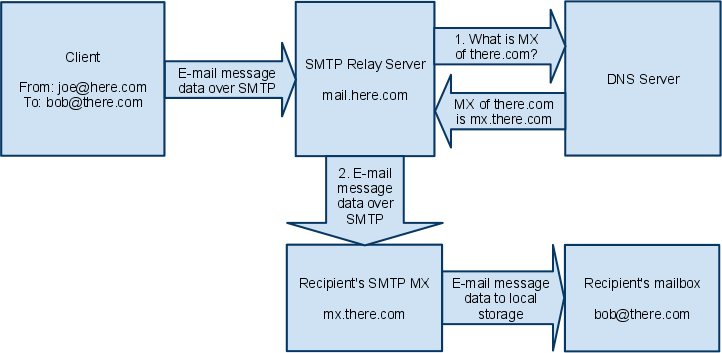
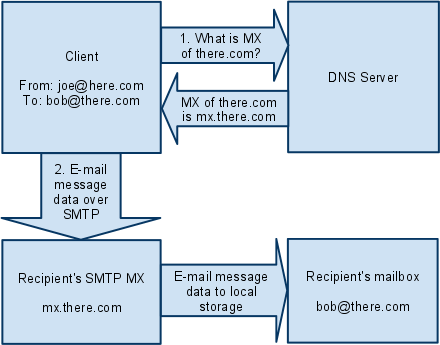
One part of this system is SMTP (Simple Mail Transfer Protocol), or the way that computers exchange messages over the internet. Computers operating this protocol are SMTP servers. As will be shown later the actual role of and SMTP server is quite straight foward and as such, the system originally allowed for each client machine to communicate to servers using SMTP directly. As more machines came online it became necessary to centralise into SMTP relays that can pass mail on the behalf of their users. This allowed other SMTP servers to trust these relays as a whole rather than trusting individual systems over a network. This process continued to consolidated into the handful of major email operators we have today.
Sending email
At its most basic level all sending email requires is a computer connected to a network and a machine on that network willing to accept messages. 1
 |
 |
Sending directly like its 1971
We can communicate directly using telnet. Below is an example of a telnet exchange to send an email to a Proton Mail user.
First we need to find the machine that is accepting mail messages. This can be done using your favourite DNS query tool, in this case dig. We are looking for the highest priority MX record.
dig -t MX protonmail.com

...
;; OPT PSEUDOSECTION:
; EDNS: version: 0, flags:; udp: 65494
;; QUESTION SECTION:
;protonmail.com.                        IN      MX

;; ANSWER SECTION:
protonmail.com.         96      IN      MX      5 mail.protonmail.ch.
protonmail.com.         96      IN      MX      10 mailsec.protonmail.ch.

...
As shown in the response mail.proton.ch is the highest priority MX record, therefore its where we need to connect to send our email.
Next we can connect over telnet to our server, the default port for SMTP is 25. An example to connect is telnet mail.protonmail.ch, but your client may be different.
Once connected the transaction can begin, an example transaction and an explanation is given below. Note that all messages received by us from the server have a leading 3 digit number that represents the status of our command. 2
Connected to mail.protonmail.ch.
Escape character is '^]'.
220 mailinzur109.protonmail.ch ESMTP Postfix
ehlo somefakewebsite.com
250-mailinzur109.protonmail.ch
250-PIPELINING
250-SIZE 71500000
250-STARTTLS
250-ENHANCEDSTATUSCODES
250-8BITMIME
250 CHUNKING
mail from:<my-pc@somefakewebsite.com> size=87
250 2.1.0 Ok
rcpt to:<user@protonmail.com>
250 2.1.5 Ok
data
354 End data with <CR><LF>.<CR><LF>
From: my-pc@somefakewebsite.com
To: user@protonmail.com
Subject:Welcome to the Web

Some body of text
.
250 2.0.0 Ok: queued as 4f2SSH43Gdz3K
quit
221 2.0.0 Bye
Connection closed by foreign host.
There is alot of interesting information here and you can create some pretty quirky error messages if you experiment here.
- First we introduce ourselves
ehlo somefakewebsite.comsince we don’t intend to have our message properly validated you can make something up here, or good convention is to put in your ip address. - Next send
mail from:<my-pc@somefakewebsite.com>to specify who the email is from, again since this isn’t being validated we can make something up here, however keep in mind that differing from the domain used in step 1 may cause some servers to reject or drop your message. - Specify who we’re sending to
rcpt to:<user@protonmail.com>. Keep in mind this will usually have to be a user at the machine we’re connected to, but some servers will forward messages to other domains. - Send
datato indicate the start of our message. - The data block can contain alot more fields than the ones shown here. Usually the From and To fields will have to match the information given in steps 2 and 3. Also note the extra newline after the dot to indicate the end of the message.
From: my-pc@somefakewebsite.com
To: user@protonmail.com
Subject:Welcome to the Web

Some body of text
.
- Close our connection to the server by sending
quitAnd just like that you should have sent an email directly to your junk mail box. Theres also a pretty good chance it was silently discarded depending on your email provider but assuming the server replied with a 200 code after the data your message was sent. This process can be created in any language. 3
Sending over relay
Using a relay is the more typical method, so much so that most mail programs wont let you send emails unless you specify a single SMTP server to send emails through. The ubiquitus terminal mail problem is s-nail and what I will be using for this example. S-nail is configured using a mailrc file. You can run your own SMTP server, however to ensure your messages go though youll probably need to use a commercial offering. A basic config is given below. Note that the USER and PASS must be URL encoded. 4
set v15-compat
set mta=smtp://USER:PASS@HOST smtp-use-starttls
Then to send a message simply run.
echo "Message body" | mail -s "Subject" reciver@there.com
By sending a message via the relay we can pass any validation checks the reciver may have.
-
https://afterlogic.com/mailbee-net/docs/direct_send.html SMTP image Sources ↩︎
-
https://learn.microsoft.com/en-us/exchange/mail-flow/test-smtp-telnet Microsoft Provdes a comprehsive overview of using SMTP directly over telnet ↩︎
-
https://serverfault.com/questions/833809/send-mail-without-mta-gmail-etc Python code for sending mail directly ↩︎
-
https://wiki.archlinux.org/title/S-nail S-nail Docs ↩︎